
Cleaning Up AI-Generated PowerPoint Decks and Word Docs (PPTX / DOCX / PDF)
AI-generated Office deliverables break in five predictable ways: pasted **bold** Markdown asterisks, 120+ word slide walls, >6 bullets per slide, shrunk normAutofit fonts below 80%, and vague titles like 'Overview' or 'Analysis of Q3 Retention'. Inspect the OOXML and PDF text layers deterministically before sending.
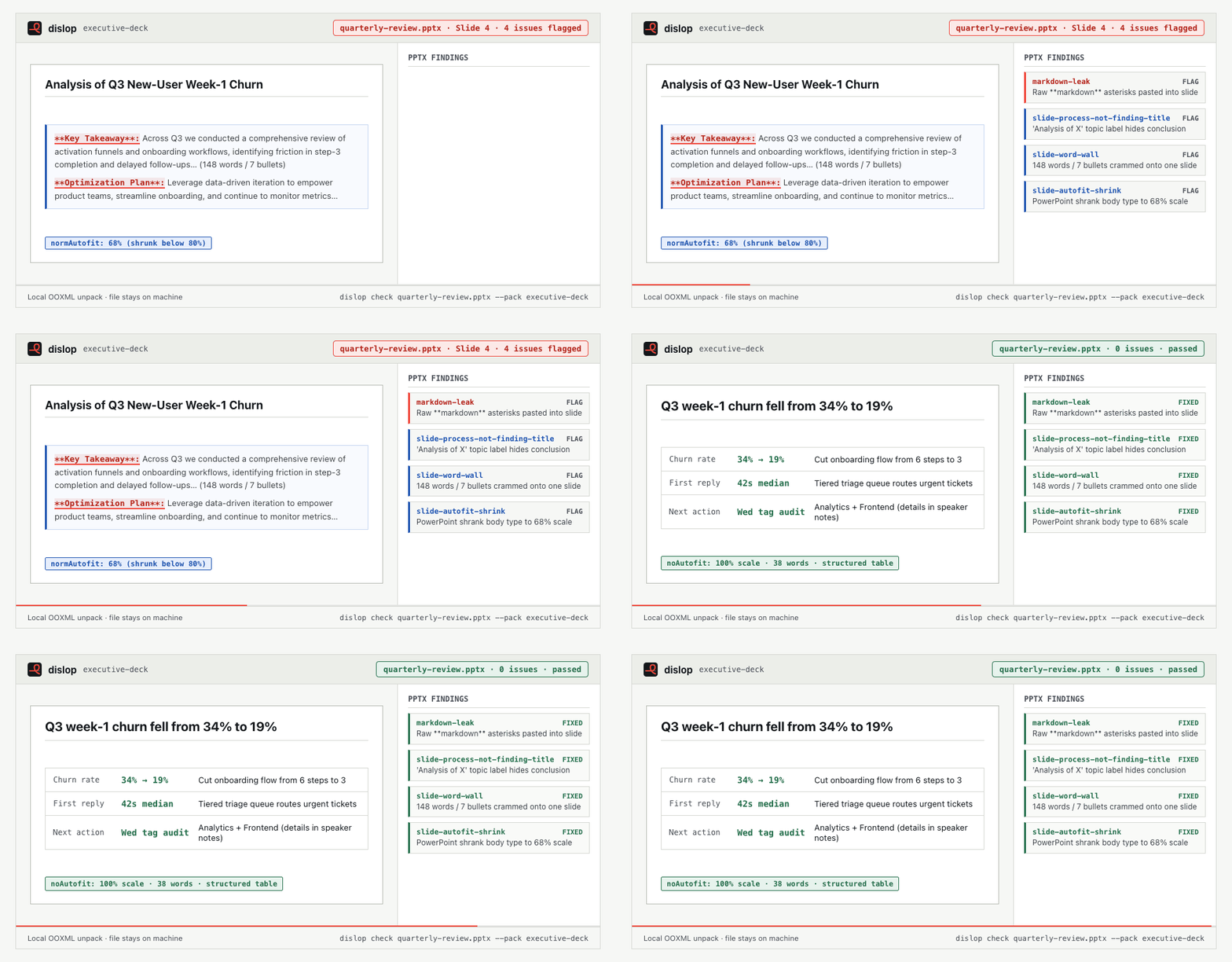
An LLM can draft a 15-slide deck or a 10-page Word memo in thirty seconds, yet sending it raw almost always leaves telltale damage: unrendered **bold** asterisks copied from chat, a slide jammed with 160 words shrunk down by PowerPoint autofit, and five consecutive slides titled "Overview" or "Analysis of Q3 Retention."
Inspecting the underlying .docx, .pptx, and .pdf structures programmatically catches these defects in one pass.
1. Seven structural defects in AI Office files
| Rule ID | What shows up in the deck or doc | Why it hurts readers | Clean fix |
|---|---|---|---|
markdown-leak | Raw **key metric** or ## Heading in Word or PPTX | Hard delivery bug showing raw chat copy-paste | Strip syntax and apply native bold/heading styles |
slide-word-wall | More than 120 Latin words on a single PowerPoint slide | Turns a visual slide into an unreadable wall of text | Split the claim or trim to one takeaway plus data |
slide-bullet-overload | 7 or more bullets packed onto one slide | Hides priority; reads like a raw brainstorm dump | Consolidate to 3–5 sharp points |
slide-autofit-shrink | normAutofit font scale pushed below 80% | Text shrinks until back-row readers cannot scan it | Cut filler words until body text sits cleanly at scale |
slide-weak-topic-title | Slide headlines such as "Overview" or "Background" | Tells the audience the topic, not the takeaway | Replace with a single-sentence conclusion |
slide-process-not-finding-title | "Analysis of Q3 Customer Retention" | Names the activity instead of the finding | Put the metric in the headline ("Q3 Net Retention Rose from 88% to 94%") |
pptx-layout-monotony | 4+ consecutive slides sharing one identical bullet skeleton | Creates visual fatigue across executive reviews | Convert comparisons or trends into tables or charts |
Compare how an executive deck headline moves from a process label to a hype trap to a concrete finding:
bad:  ## Analysis of Q3 Customer Retention (88% to 94%)
trap: ## Unlocking the Next-Gen Retention Flywheel
good: ## Q3 Net Retention Rose from 88% to 94%
Notice how trap dropped the actual numbers (88% to 94%) in favor of an empty metaphor (Retention Flywheel).
2. Check Office and PDF files offline
Keep confidential quarterly decks and internal memos on your machine using the zero-upload CLI:
# Node CLI (zero dependencies)
npx --yes dislop check proposal.docx board-deck.pptx summary.pdf

# Python CLI (with executive-deck headline rules)
uvx dislop check board-deck.pptx --pack executive-deck
If an archive is corrupted, password-locked, or exported as an unreadable scan with zero selectable text, dislop prints [SKIP] or a coverage warning (exiting 2 on single-file runs) instead of pretending the file passed with 0 issues.
3. Layout-preserving cloud cleanup (optional)
When you want multi-model prose cleanup that keeps .docx Track Changes or .pptx master layouts intact:
- Run local
dislop checkfirst and fill any missing bracketed numbers manually. - Sign in on the workbench or connect Official Cloud MCP (
https://dislop.com/mcp) for non-confidential drafts. - Re-run local
dislop checkon the exported file to verify numbers and clean structure held up.
Frequently asked questions
Does inspecting a .docx or .pptx in the browser workbench upload the file?
No. Local checks unzip OOXML entries inside your current browser tab with zero network requests. Files are only sent to the cloud service when you sign in and click a Cloud Review or Cloud Rewrite button.
Why flag slides just for having 4 identical bullet layouts in a row?
LLM slide generators repeat the same 'Title + 4 bullets' template across consecutive slides instead of switching to comparison tables, timelines, or charts—causing immediate reader fatigue.
Can dislop check landscape PDF decks exported from Keynote or Google Slides?
Yes. It checks whether pages were flattened into unselectable raster images, whether body typography drops below 9.5pt, and whether 4+ consecutive landscape slides share a flat text-only scale.
Matching deterministic rules
Next guides
Verified references
- Wikipedia: Signs of AI writing (WP:AISIGNS) — WikiProject AI Cleanup's living taxonomy of AI prose defects: inflated significance, stock vocabulary, rule-of-three lists, negative parallelisms, chatbot wrappers, and formatting artifacts.
- ASD-STE100 Simplified Technical English Specification — Aerospace and technical documentation specification enforcing short active sentences, one instruction per sentence, and consistent naming for the same concept.
- Digital.gov Plain Language Guide (formerly PlainLanguage.gov) — Federal plain-writing rules: front-load key conclusions, use active voice, replace hidden verbs and filler openings with concrete actors and actions.
- Stiftung Buchkunst — Best Book Design from all over the World — Book proportion, margin choreography, and reading pacing benchmarks directly transferable to PDF reports and presentation decks.