
Fixing AI Slop in Web UI: Beyond Purple Gradients, Pill Soup, and Dead Buttons
AI-generated web UIs look interchangeable when they fall back on purple-pink gradients, pill-badge walls, 3-level nested cards, fake macOS window dots, and dead href='#' buttons. Replace template chrome with 1px structural grids, clear type hierarchy, and deterministic HTML/CSS linting.
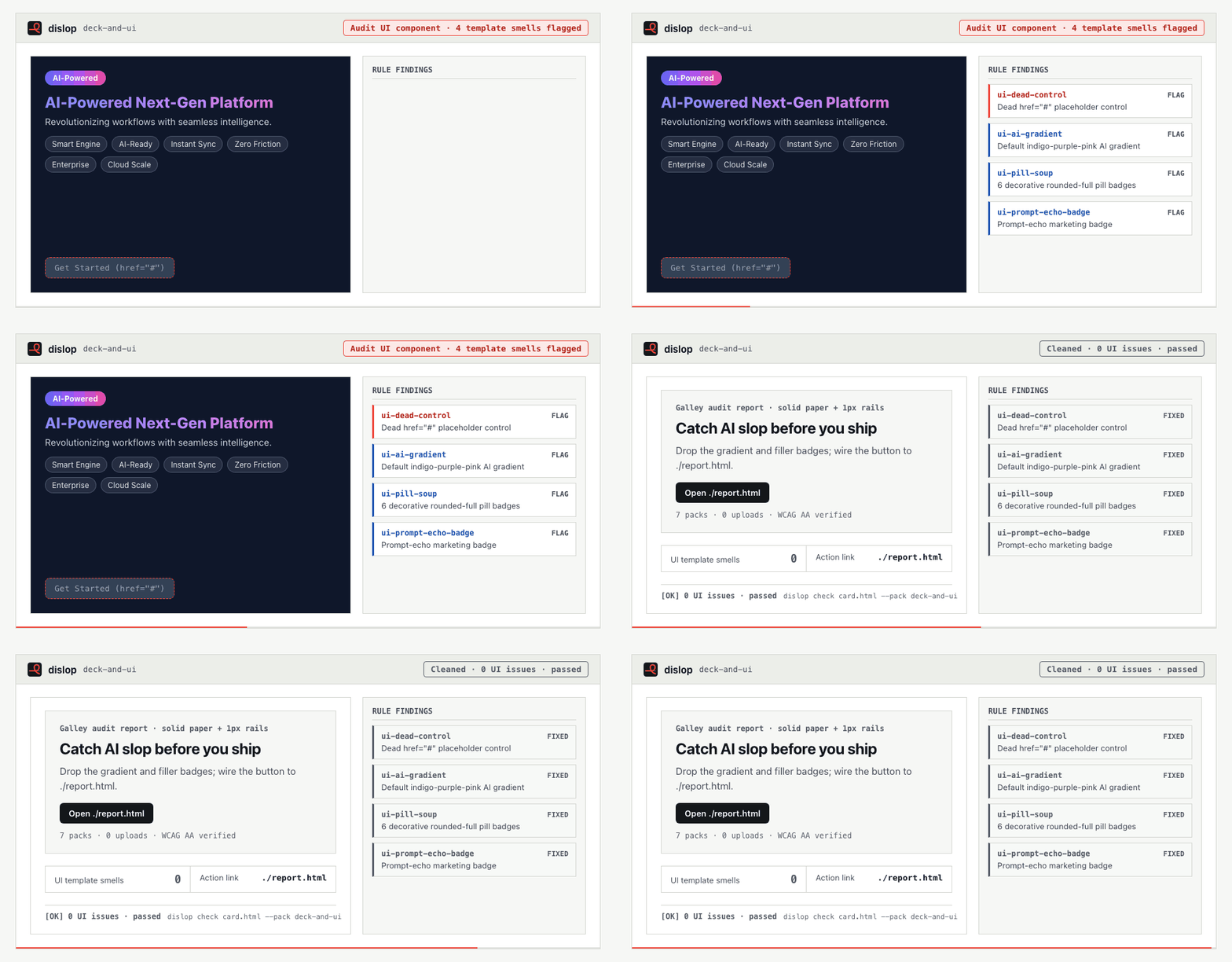
Ask a coding agent to scaffold a landing page or admin dashboard, and eight times out of ten you get the same template. It puts blurred purple orbs on the background, adds gradient hero text, draws fake macOS window dots above pastel icon cards, and wires "Get Started" to href="#".
That convergence is why design skills like Anthropic's frontend-design (198,134 stars) and pbakaus/impeccable (114,155 stars) gained rapid adoption. Fixing it does not require rewriting your stack—it requires catching template habits automatically before merge.
1. Seven UI defects that scream "generated template"
| Rule ID | What appears in code | Why it hurts users | Clean fix |
|---|---|---|---|
ui-dead-control | <a href="#">Download</a> or unexplained <button disabled> | Hard functional bug; users click controls that go nowhere | Wire real destinations or remove unbuilt actions |
ui-ai-gradient | from-indigo-500 via-purple-500 to-pink-500 clipped text | Instantly marks a generic SaaS template and lowers contrast | Use crisp solid ink and reserve a single brand accent |
ui-pill-soup | 7+ rounded-full pill tags stacked on one card | Drowns out the one status badge users actually need | Format routine metadata as plain ·-separated text |
ui-box-in-box | Three nested border rounded-xl p-4 wrappers | Eats mobile viewport width with repetitive padding | Use alignment, whitespace, or single 1px dividers |
ui-prompt-echo-badge | Eyebrow stickers saying "AI-Powered · Zero Hallucination" | Echoes marketing prompt slogans instead of product function | Name the concrete behavior ("Runs offline locally") |
ui-glow-blob-chrome | blur-3xl neon background orbs and animate-ping dots | Visual noise with zero information value | Remove decorative orbs; separate layers with surface tone |
ui-template-card-grid | 01/02/03 eyebrow numbers, fake window dots, 🚀✨🛡️ icons | Makes every feature section look identical | Lead with direct headings and real product screenshots |
2. Before and after markup
bad:
<div class="border rounded-xl p-6 bg-gradient-to-r from-indigo-500 via-purple-500 to-pink-500">
  <span class="rounded-full px-3 py-1">AI-Powered · Zero Hallucination</span>
  <h3>🚀 Blazing Fast Audits</h3>
  <a href="#">Download Report</a>
</div>

good:
<section class="surface-sheet">
  <span class="section-meta">Local offline engine</span>
  <h3>50ms checks with zero uploads</h3>
  <a href="./report.html">Download report</a>
</section>
For inline <svg> diagrams, check two additional failure modes: large canvases missing an explicit viewBox (which clip on mobile) and overlapping <text> coordinates.
3. Keep pages grounded without heavy frameworks
- Adopt print-inspired constraints: Study modular grids and type pairings from
Norm (Zurich),Fonts In Use, andStiftung Buchkunst. Pair one readable UI sans-serif with a monospace font for code, rule IDs, and numbers, and enforce WCAG 2.2 AA contrast (>= 4.5:1for text,>= 3.0:1for control borders). - Keep runtime dependencies minimal: Avoid third-party font CDNs or tracking scripts when static HTML/CSS solves the job faster.
- Gate HTML, CSS, JSX, and SVG in CI:
npx --yes dislop check site/ --pack deck-and-ui --fail-on warningYou can also drop any .html, .css, .jsx, .svg, or .png file directly into the browser workbench on the homepage to inspect UI slop locally without uploading files.
Frequently asked questions
Why do coding agents keep generating purple-indigo gradients and glow blobs?
Under generic prompts like 'modern SaaS landing page', models default to the highest-probability Tailwind patterns in their training mix: indigo-to-pink gradients, blur-3xl orbs, and three-column icon cards.
Can static code analysis actually catch AI UI slop without opening a browser?
Yes for structural and markup defects. Deterministic probes reliably catch dead href='#' anchors, unexplained disabled buttons, purple-pink gradient stops, 7+ rounded-full pills per view, 3-level nested borders, and SVGs missing viewBox or overlapping text coordinates.
What references help teams move beyond SaaS templates?
Browse independent print, foundry, and editorial archives such as Norm (Zurich), Fonts In Use, and Stiftung Buchkunst. Rely on grid proportions, 1px hairline rules, and real product specimens instead of glowing card chrome.
Matching deterministic rules
Next guides
Verified references
- anthropics/skills — frontend-design — 198,134 repo stars (2026-11-21 snapshot); warns coding agents against generic SaaS palettes, purple gradients, and default AI card grids.
- pbakaus/impeccable: Design rules & /audit workflow for AI-built UI — 114,155 stars (2026-11-21 snapshot); packages frontend anti-slop design rules, 7 domain references, and commands like /audit and /polish.
- nextlevelbuilder/ui-ux-pro-max-skill — 152,711 stars (2026-11-21 snapshot); supplies pre-built palette, font, and layout constraints for AI coding tools.
- Norm (Zurich) — Modular Graphic Systems — Independent Swiss studio demonstrating modular grids, restrained micro-typography, and zero-ornament structure.
- Fonts In Use — Indexed archive of real-world type pairings across print, signage, and web interfaces instead of generic SaaS defaults.
- Stiftung Buchkunst — Best Book Design from all over the World — Book proportion, margin choreography, and reading pacing benchmarks directly transferable to PDF reports and presentation decks.